This post contains affiliate links. If you buy through them, we may earn a small commission at no extra cost to you.
“Which network am I actually going to be on if I buy a Korea eSIM?”
Most travelers never ask this question, and honestly, most eSIM sellers would rather you didn’t either.
You’ve probably already seen a dozen “best eSIM for South Korea” roundups comparing Airalo, Holafly, Nomad, and other marketplaces on price and gigabytes. What almost none of them explain is that these companies aren’t carriers. Only three companies actually run mobile networks in Korea, SK Telecom (SKT), KT, and LG Uplus (LG U+), and every eSIM you buy, no matter whose logo is on the checkout page, ultimately runs on one of those three networks.
Here’s the part that gets messier: even the sellers themselves don’t always agree on which network they’re reselling. Airalo’s own blog says one thing, an independent study says another, and a competitor’s comparison page says a third.
This guide breaks down the real network structure behind Korea’s eSIM market, compares the official carrier plans against global marketplaces price by price, and walks through exactly what your Korean eSIM number can and can’t do once you land, including a verification limit almost no one mentions.
1. Why Every Korea eSIM Runs on One of Three Real Networks
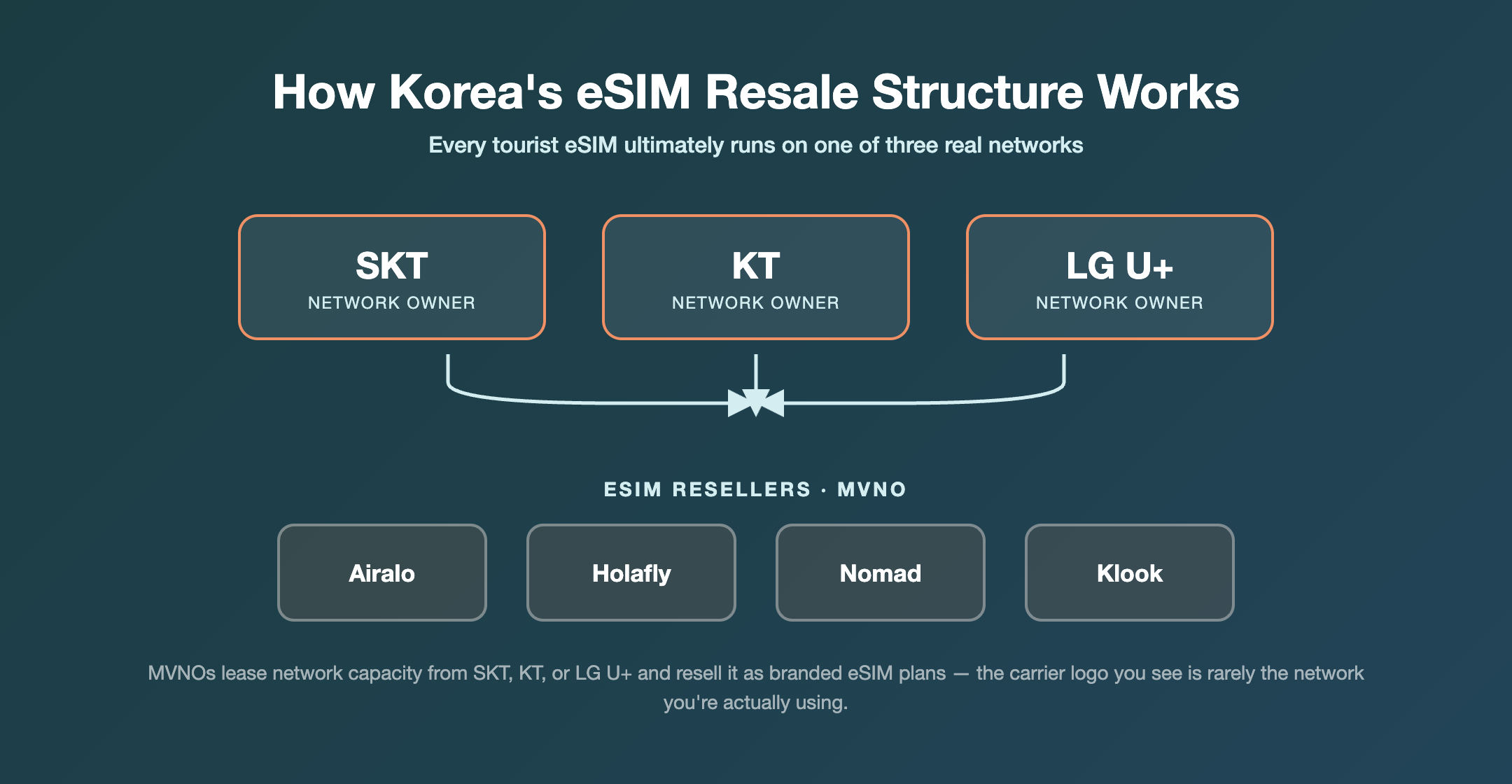
Korea has only three companies that own and operate actual mobile network infrastructure: SK Telecom (SKT), KT, and LG Uplus (LG U+). In telecom terms, these are the “mobile network operators,” or MNOs. Every other brand selling SIMs or eSIMs in Korea, including the tourist eSIM marketplaces most travelers find through a search, is a reseller renting access to one of those three networks.
This isn’t a loophole, it’s built into Korean telecom law. Korea has run a “wholesale provision obligation system” since 2010, requiring network owners to lease capacity to smaller resellers (MVNOs, or mobile virtual network operators) at wholesale rates. Korea Cable Telecom (KCT) became Korea’s first MVNO after registering in 2010 and signing a deal with SK Telecom, launching service in 2011.
As of 2026, SK Telecom still legally holds the status of a mandatory wholesale provider because of its position as the dominant carrier, while KT and LG U+ lease network access through commercial agreements rather than legal obligation, though in practice their wholesale pricing often follows SKT’s as a benchmark.
The system is also evolving. On July 31, 2026, Korea’s Ministry of Science and ICT announced a policy called “MVNO 2.0,” aimed at helping resellers build their own network infrastructure (“full MVNOs”) instead of simply renting capacity, and expanding the wholesale obligation to cover all three major carriers instead of SKT alone.
Bottom line: as one independent Korea travel guide puts it, “All major eSIMs run on one of Korea’s three real networks… so the ‘provider’ you’re buying from is really just a reseller.” Whatever brand name is on your eSIM app, you’re connecting to SKT, KT, or LG U+ infrastructure underneath.
💡 Tip: Coverage and speed differences between eSIM sellers usually come down to which of these three networks they’ve licensed, not some special infrastructure of their own.
2. Which Network Does Your eSIM Actually Use? Airalo, Holafly, Nomad, and Klook Compared
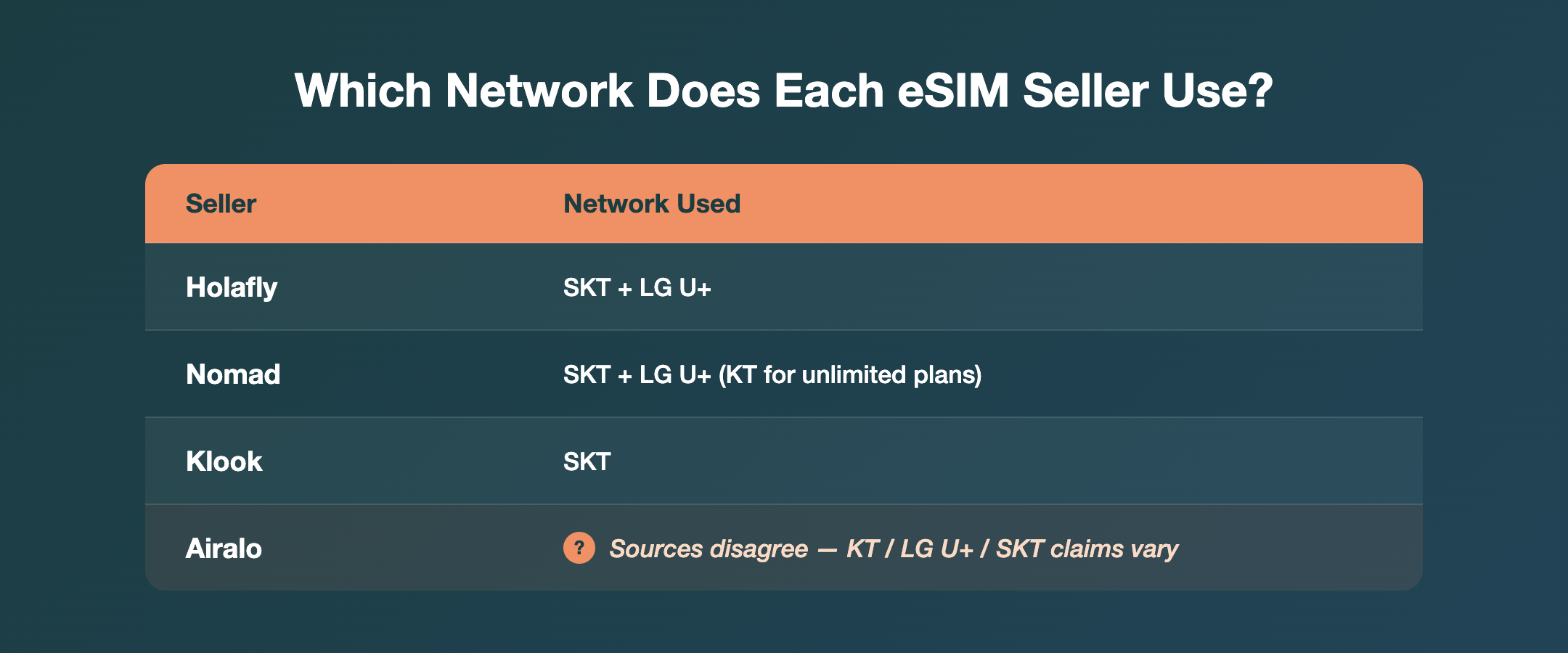
Once you know every eSIM is really a rental on SKT, KT, or LG U+, the next useful question is which network each seller actually uses. Coverage in Seoul is strong across all three, but speed and signal in rural areas or on the subway can vary carrier to carrier.
Here’s what’s confirmed directly from each seller’s own materials:
| Seller | Network(s) used | Source confidence |
|---|---|---|
| Klook | SK Telecom (SKT) | High, stated in product title |
| Holafly | SK Telecom, LG U+ | High, listed on official page |
| Nomad eSIM | SKT + LG U+ (standard plans), all three networks (unlimited plans) | High, stated on official blog |
| Travelsim Asia | SK Telecom, LG U+ | High, stated on official blog |
| Airalo | Disputed, see below | Low, sources disagree |
| aloSIM, Instabridge | KT + SK Telecom | Medium, third-party test only |
Airalo’s network is a genuine unresolved question
This is where the sources disagree, and rather than pick a side, it’s worth laying out exactly what each one says.
- Airalo’s own blog (posted February and August 2026) states it “partners with local providers like LG U+.”
- An academic paper analyzing real eSIM traffic (“Unraveling the Airalo Ecosystem,” arXiv) found that Airalo’s Korea eSIM used network codes belonging to LG U+.
- Cybernews, in a hands-on review published June 19, 2026, states that in Korea, Airalo “partners with KT.”
- Travelsim Asia, in its own comparison blog, claims Airalo’s Korea plan “runs on SK Telecom only,” though as a competing seller, that claim carries some bias.
So we have three different networks claimed across four sources. It’s possible Airalo has switched partners over time, uses different networks for different plan tiers, or that one or more sources are simply outdated, there’s no clean way to resolve this from the outside. If network choice matters to you, check the coverage details inside the Airalo app right before you buy, rather than trusting any single blog post, including this one.
One more thing worth flagging: Cybernews also mentions a Reddit thread alleging that some of Holafly’s traffic gets routed through a Chinese mobile network. That’s an unverified community report, not a confirmed fact, so treat it as a rumor to watch rather than a settled issue.
3. Official SKT, KT, and LG U+ eSIM Plans vs Global Marketplaces: Price Comparison
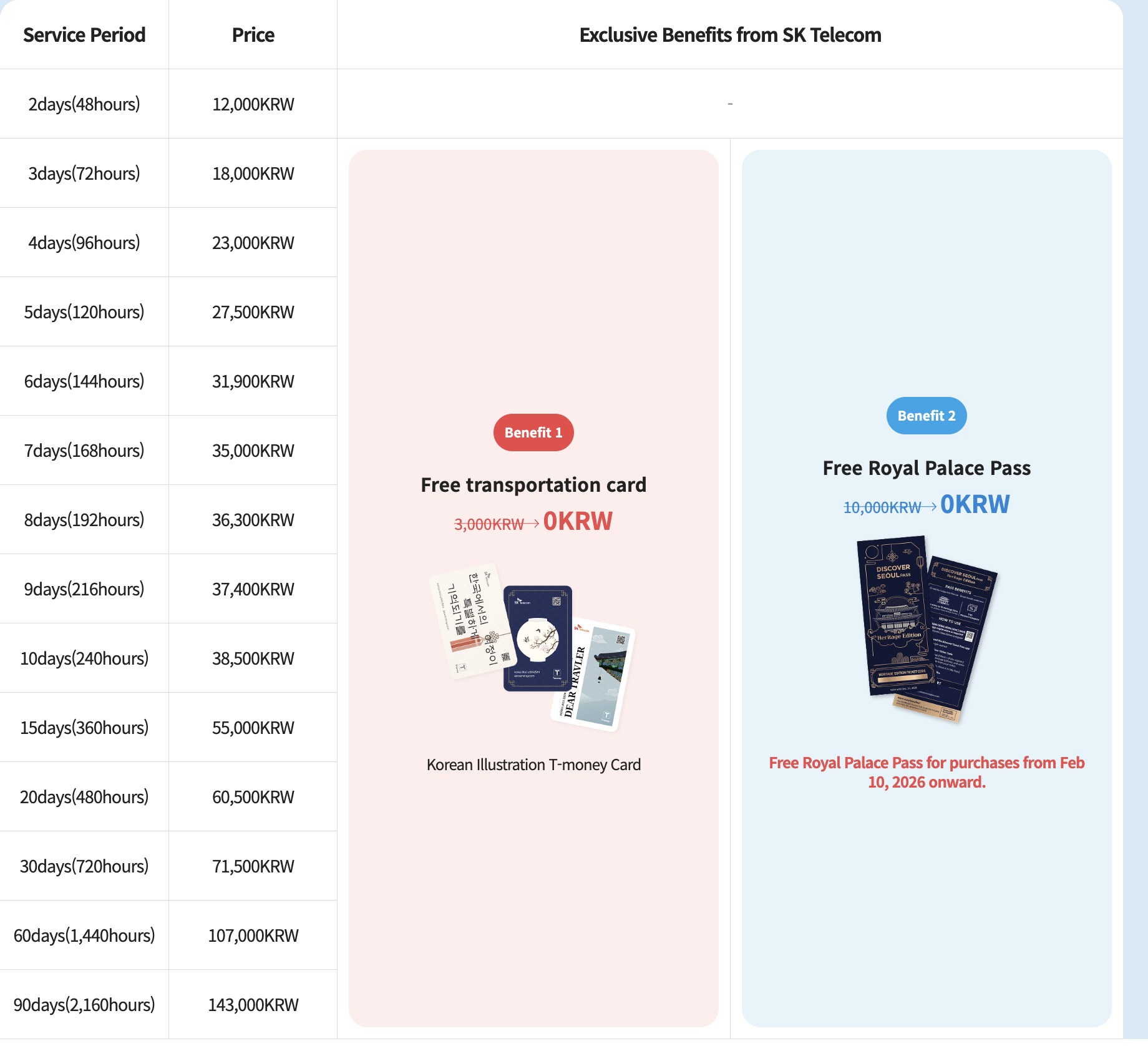
If renting through a marketplace still feels like a middleman you’d rather skip, all three Korean carriers sell their own official tourist eSIMs directly. Here’s how they stack up, current as of the September 20, 2026 check date used for this guide (carrier prices are in Korean won, VAT included).
Official carrier plans
| Carrier | 1-day | 3-day | 7-day | 30-day | Notes |
|---|---|---|---|---|---|
| KT (data-only) | ₩6,500 | ₩18,000 | ₩35,000 | ₩71,500 | 11GB/day at full speed, then capped at 5Mbps |
| SK Telecom | N/A, 2-day minimum at ₩12,000 | ₩18,000 | ₩35,000 | ₩71,500 | Unlimited data up to 100Mbps; free T-money card for 3+ day plans |
| LG U+ (data-only) | ₩6,500 | ₩18,000 | N/A, up to 4-day at ₩23,000 | N/A, up to 5-day at ₩27,500 | Truly unlimited data, no speed cap |
LG U+ only published pricing up to 5 days for its data-only eSIM on the traveler page checked for this guide, so for stays beyond that, KT and SKT’s 30-day options (both ₩71,500) are the ones with confirmed pricing.
All three carriers give a free T-money transit card when you buy 3 or more days, and SKT adds a free Royal Palace Pass (covering the Four Grand Palaces plus Jongmyo Shrine) for purchases made after February 10, 2026.
Global eSIM marketplaces
| Seller | Entry-level price | Larger/unlimited option |
|---|---|---|
| Airalo | 1GB (3 days) from $4.00 | Unlimited 15-day from 69.50 CAD |
| Holafly | 3-day unlimited from $12.50 | 30-day unlimited at $73.90 |
| Nomad eSIM | 5GB (30 days) from $10.00 | Varies by plan |
An independent guide summarizing the marketplace landscape put small data plans at roughly $4-9 and unlimited plans at $49-139, which lines up with the numbers above.
Roughly speaking: short, light-use trips land in the $4-15 range no matter which route you take, official or marketplace. Once you want unlimited data or a stay of two weeks or more, expect $30-100 and up, or the Korean-won equivalent straight from the carriers.
⚠️ One catch with KT: any plan that includes voice calls or texting can’t be bought online. You have to pick it up and verify your passport in person at the airport roaming counter. Data-only KT eSIMs, on the other hand, can be bought and installed entirely online.
4. Choosing the Right eSIM: Trip Length, Data Needs, and the Phone Number Catch
How much data do you actually need?
Messaging apps like KakaoTalk barely touch your data, but video calls are a different story, running roughly 200-300MB per hour by one independent estimate. For a typical sightseeing day mixing maps, messaging, and some social media, that same source estimates 300MB to 1GB is enough, while heavy streaming or video-calling days can eat 2-3GB.
| Trip type | Suggested plan | Rough price |
|---|---|---|
| Short trip, 1 week or less, light use | 1-10GB or a carrier 1-7 day plan | $4-35 |
| Mid-length trip, 2 weeks to 1 month | 20GB+ or unlimited | $30-100+, or ₩55,000-143,000 |
| Heavy user (streaming, video calls, remote work) | Unlimited plan from the start | $49-139 |
| Long-term stay, 90+ days | Carrier tourist eSIMs aren’t designed for this | See note below |
⚠️ 90+ day stays: All three carriers’ official tourist eSIM pages describe these products as built for short-term visitors within 90 days. What long-term foreign residents should sign up for instead isn’t something this research could confirm. If you’re staying past 90 days, it’s worth contacting a carrier directly or asking about an Alien Registration Card-based plan once you’re settled.
The phone number catch nobody mentions
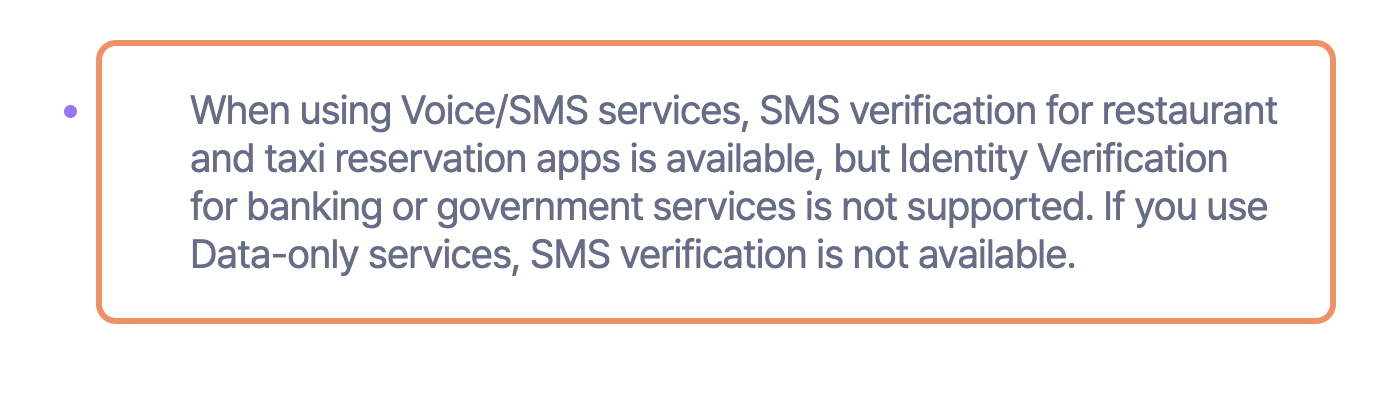
Here’s the part most “best eSIM” roundups skip entirely. Even if your eSIM comes with a Korean 010 number and full voice/SMS service, that number has real limits, and this is confirmed straight from carrier FAQs, not a blog guess.
LG U+’s official FAQ spells it out:
“Identity verification cannot be done using the [SIM]. When using Voice/SMS services, SMS verification for restaurant and taxi reservation apps is available, but Identity Verification for banking or government services is not supported. If you use Data-only services, SMS verification is not available.”
SKT’s official site says something similar, noting that “personal authentication services” and payment-related text messages aren’t supported on its tourist eSIM.
In plain terms: your Korean eSIM number can handle SMS codes for things like restaurant reservations or ride-hailing apps, once you’ve completed passport verification on a voice/SMS plan, but it cannot verify you for a Korean bank account or a government service. If your trip involves opening a Korean bank account or using a government portal, this eSIM number won’t get you there, and this research didn’t turn up a confirmed alternative process for short-term tourists.
Check your phone can even take an eSIM first
Dial *#06# on your phone. If an EID number starting with “89” shows up, your device supports eSIM. On iPhone, check Settings > General > About for a “No SIM restrictions” line to confirm it’s unlocked. Android doesn’t offer an equivalent self-check, so you’ll need to contact your home carrier to confirm unlock status. Several sellers, including Nomad eSIM, also publish their own compatibility checker tools if you’d rather not dig through settings menus.
✅ Good news either way: installing a Korea eSIM doesn’t touch your home SIM. You can keep receiving calls and texts on your home number while your Korean eSIM handles data, no need to choose one or the other.
5. eSIM vs Physical SIM vs Pocket WiFi: Which One Fits Your Trip
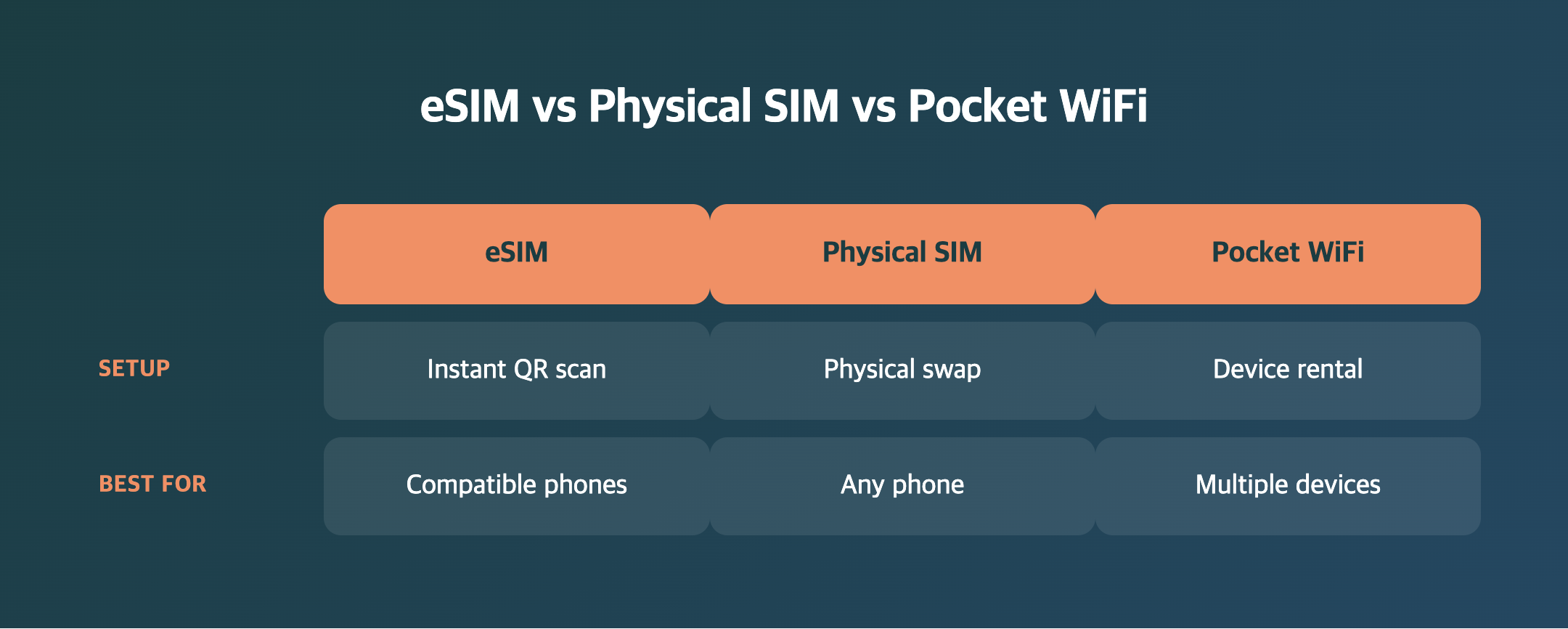
| eSIM | Physical SIM | Pocket WiFi | |
|---|---|---|---|
| Setup | Install QR code digitally, no airport counter needed | Pick up at a counter or store, swap the physical card in | Reserve online, pick up and return a device |
| Korean phone number | Depends on plan, data-only has none | Usually included | None, the device itself has no number |
| Keep your home number | Yes, works alongside your existing SIM | No, home SIM gets deactivated when swapped out | Yes, doesn’t touch your phone’s SIM |
| Best for | Solo travelers with a recent smartphone | Older phones without eSIM, or anyone who needs a Korean number | Groups or families, or anyone connecting a laptop too |
| Downside | Won’t work on unsupported or locked phones | Pickup hassle, risk of losing a tiny card | Extra device to carry and charge, connection dies if the battery does |
Pocket WiFi rental typically requires your original passport and a physical credit card (debit cards and card photos usually aren’t accepted), plus a deposit or card hold. Forget to return the device on time and daily rental fees keep adding up, so it’s worth knowing your return deadline before you fly home.
Rough 7-day price ranges from an independent 2026 guide: eSIM $8-15, physical SIM $8-18, pocket WiFi $20-50 (that last one covers one device, so it gets cheaper per person the bigger your group is).
6. How to Install and Activate Your Korea eSIM, Step by Step
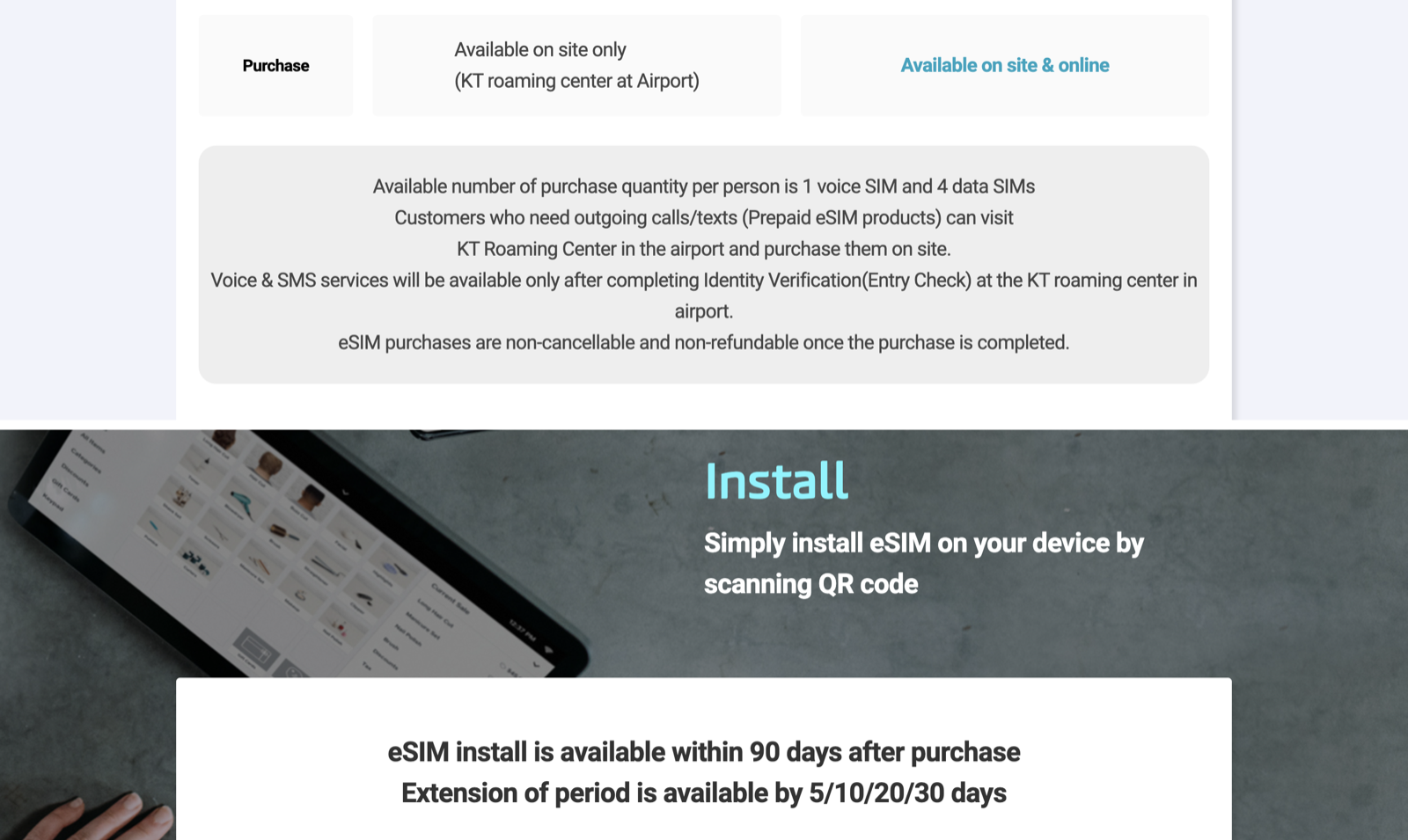
- Buy your eSIM. Pay through the seller’s website or app, then get your QR code by email or in-app.
- Install on Wi-Fi. Most sellers, including Airalo, recommend a stable Wi-Fi connection for installation, since an eSIM profile can only be installed once and a dropped connection mid-install can cause it to fail.
- Pick your install method. Airalo, for one, offers three: a one-tap direct install from within the app, scanning the QR code with a second device, or manually entering the SM-DP+ address and activation code in your phone’s settings.
- Install before you fly, activate after you land. Sellers including Holafly and Airalo recommend installing the eSIM profile before departure but waiting to turn on data roaming until you’ve landed in Korea, so your validity window doesn’t start ticking away mid-flight.
- Turn on the network. Go to Settings > Mobile/Cellular > turn on your Korea eSIM line > enable data roaming if needed. Plans covering multiple networks may let you manually pick one.
- Complete passport verification if your plan includes voice/SMS. For SKT and KT plans with calling, scan the QR code in your confirmation email or voucher, submit your passport details, and wait for an SMS confirmation. SKT specifically limits this verification window to 8 a.m. to 10 p.m.
⚠️ KT’s voice/SMS plans can’t be activated online at all. You’ll need to visit KT’s roaming counter at Incheon Airport in person for passport verification before the SIM works, unlike KT’s data-only plans, which install entirely from your phone.
💡 Airport counters exist too, if you’d rather skip pre-booking. Incheon Airport has SKT, KT, and LG U+ counters in both terminals, and SKT operates the most counters of the three by its own count. One independent guide claims SKT’s Terminal 2 counter runs 24 hours while KT and LG U+ counters are daytime-only, though that’s a travel blog’s observation rather than something confirmed on the carriers’ official sites, worth double-checking if your flight lands late at night.
👉 Compare SKT’s official eSIM plans and pricing
7. Frequently Asked Questions
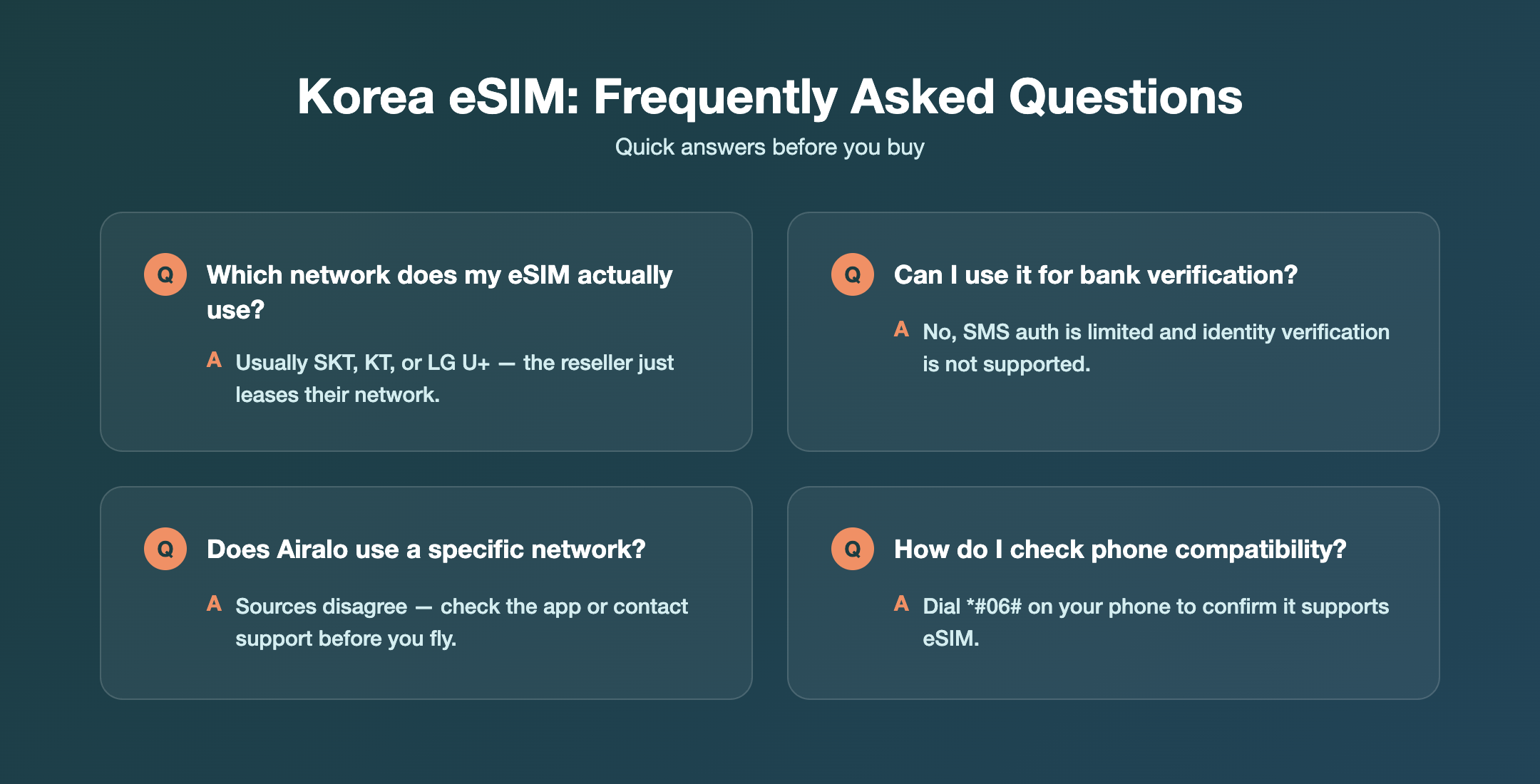
Q1. Does it matter which eSIM seller I use if they’re all renting the same three networks?
A. Somewhat. Coverage quality depends on which network(s) a seller licenses, and that varies, some resell just one carrier, others blend two or three. Price, data allowance, and customer support quality still differ a lot between sellers even on the same underlying network.
Q2. Can I use my Korea eSIM number to open a bank account or verify a government app?
A. No. Both LG U+ and SKT confirm on their official pages that personal identity verification for banking or government services isn’t supported on their tourist eSIMs. SMS verification for things like restaurant or taxi apps works once you’ve completed passport verification, but banking and government portals are out of reach.
Q3. How do I know if my phone supports eSIM?
A. Dial *#06#. An EID number starting with “89” means your device supports eSIM. iPhone users can also check Settings > General > About for “No SIM restrictions” to confirm it’s unlocked.
Q4. Which network does Airalo actually use in Korea?
A. Unclear. Airalo’s own blog and an independent academic study point to LG U+, while a hands-on review from Cybernews says KT, and a competing seller claims SK Telecom. Check the coverage info inside the Airalo app before buying rather than relying on any single source.
Q5. Do I need to remove my home SIM to use a Korea eSIM?
A. No. An eSIM installs as a separate digital profile alongside your existing SIM, so you keep receiving calls and texts on your home number while the Korean eSIM handles your data.
Conclusion: Know the Network Before You Buy the Brand
The eSIM marketplace you check out with is just packaging. What actually gets you online in Korea is SK Telecom, KT, or LG U+, and once you know that, the rest of the decision gets a lot simpler.
✅ Four things to remember
- Every Korea eSIM, official or third-party, runs on SK Telecom, KT, or LG U+ underneath, so the “seller” is really a reseller
- Airalo’s actual network in Korea is genuinely disputed across sources, check the app’s coverage details before buying if it matters to you
- Your Korean eSIM number can’t verify you for banking or government services, even with a voice/SMS plan, per LG U+ and SKT’s own FAQs
- Check
*#06#for eSIM support before you buy anything, and remember installing a Korea eSIM never touches your home SIM
Whether you go with an official carrier plan or a global marketplace, matching your plan to your actual trip length and data habits matters more than chasing the cheapest sticker price.
👉 See Klook’s 5G unlimited Korea eSIM (runs on SKT)
👉 Browse Airalo’s Korea eSIM plans and coverage
Sources
- KT official roaming site, eSIM product page — https://roaming.kt.com/eng/esim
- SK Telecom official roaming site, eSIM product page — https://www.skroaming.com/esim/esim
- LG Uplus official traveler site, Korea eSIM product and FAQ — https://www.lguplus.com/korea-sim/eng/pc/product/esim?tab=data
- Airalo official site and blog — https://www.airalo.com/south-korea-esim , https://www.airalo.com/blog/best-esim-south-korea
- Holafly official South Korea eSIM page — https://esim.holafly.com/esim-south-korea/
- Nomad eSIM official blog — https://www.nomadesim.com/blog/best-esim-for-south-korea
- Travelsim Asia official blog — https://travelsimasia.com/blogs/south-korea-guides/travelsim-asia-vs-airalo-south-korea-esim
- Cybernews, “Best eSIM for South Korea in 2026” (2026-06-19) — https://cybernews.com/best-esim-providers/best-esim-for-south-korea/
- arXiv, “Unraveling the Airalo Ecosystem” — https://arxiv.org/html/2408.14923v1
- Klook, “5G Unlimited Prepaid eSIM South Korea | SKT” — https://www.klook.com/en-US/activity/109354-south-korea-esim-high-speed-internet-qr-code-voucher/
- koreavisiting.com, “Korea SIM Card vs eSIM vs Pocket WiFi: 2026 Guide” — https://koreavisiting.com/korea-sim-card-vs-esim-vs-pocket-wifi-2026-guide
- koreary.com, “SIM, eSIM & Pocket WiFi in Korea 2026” — https://www.koreary.com/2026/07/sim-esim-pocket-wifi-korea-2026.html
📌 Found this useful? Save it for anyone you know planning a Korea trip!