No Korean Phone Number in Korea? How to Book, Ride and Order (2026)
“Stuck at a +82 verification screen?”
You open a restaurant booking app, a taxi app, or a delivery app in Korea, and the first thing it wants is a phone number. You type in your own country’s number, hit send, and the code never arrives, or the app refuses your number altogether. You’re not imagining it, and you’re not doing anything wrong.
Here’s the answer up front: that’s finally changing, but unevenly. As of October 2026, there are official ways to book restaurants, order delivery, and call a taxi in Korea without a Korean mobile number. Naver added passport-based verification on June 4, 2026. CatchTable Global lets you sign up without a Korean number. Baemin says so explicitly on its own site. Kakao Mobility runs a separate app, k.ride, built specifically for travelers.
But there’s a catch that most guides miss, and it’s the most important thing in this article: even where the technology now allows foreign bookings, individual businesses can still switch that option off. A passport-verified Naver account doesn’t guarantee every restaurant will take your reservation. Below, I’ll walk through exactly what works, what’s genuinely unclear, and what to do when a booking won’t go through. Everything here was checked against official sources as of October 1, 2026.
1. Why “+82 Required” Locks So Many Travelers Out
Many Korean apps confirm who you are with a text message sent to your phone. Kakao Mobility’s own research on foreign Kakao T users spells out the problem: SMS-based phone verification is mandatory, and travelers often can’t receive those text messages while they’re outside their home country.
Naver says the same thing in its own words. Its passport verification launch was aimed at “the inconveniences faced by short-term foreign visitors who do not have Korean mobile phone numbers, including difficulties making reservations at popular venues or paying at popular restaurants.”
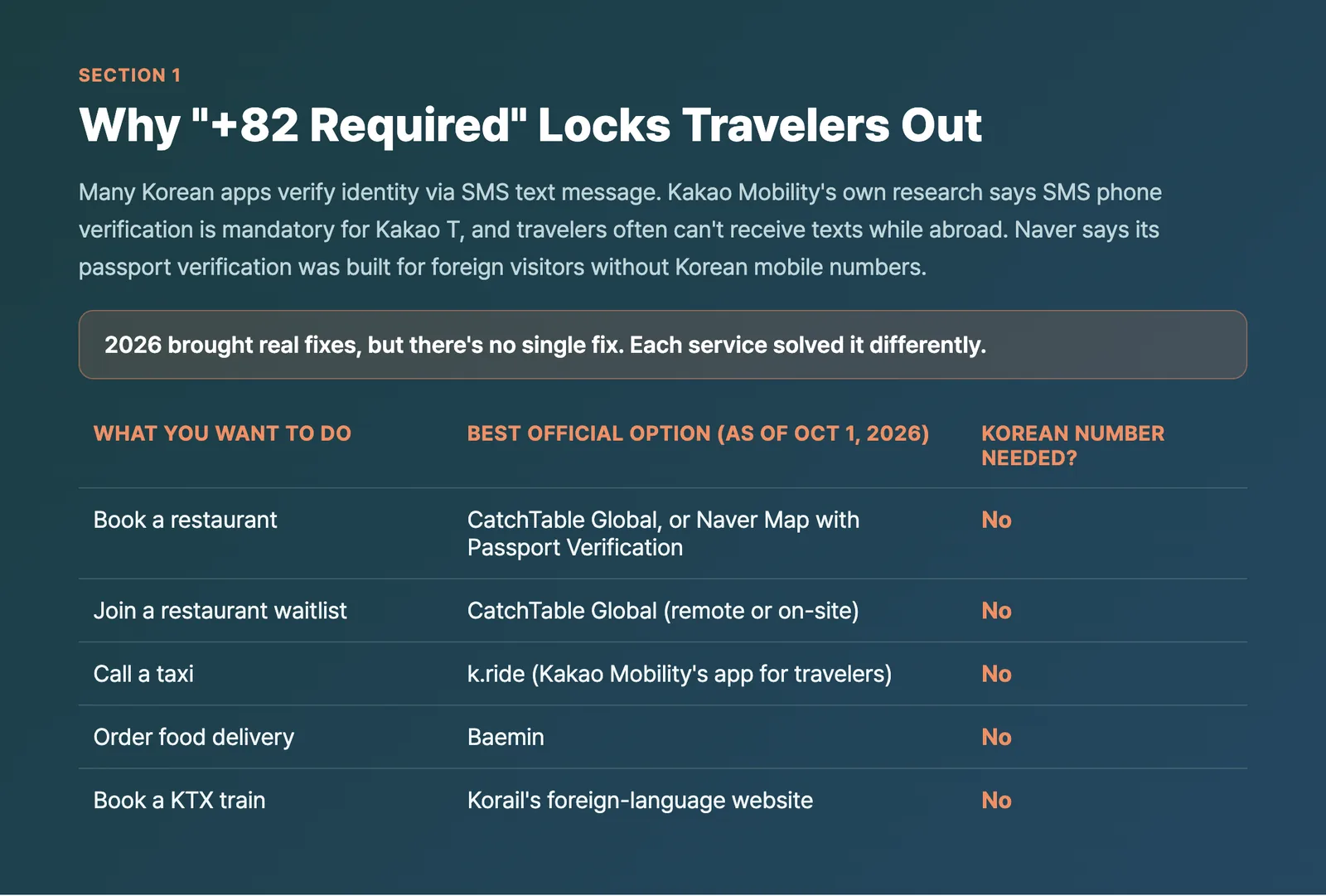
The good news is that 2026 brought real fixes. The less good news is that there’s no single fix. Each service solved it differently, and they don’t all cover the same ground.
| What you want to do | Best official option (as of Oct 1, 2026) | Korean number needed? |
|---|---|---|
| Book a restaurant | CatchTable Global, or Naver Map with Passport Verification | No |
| Join a restaurant waitlist | CatchTable Global (remote or on-site) | No |
| Call a taxi | k.ride (Kakao Mobility’s app for travelers) | No |
| Order food delivery | Baemin | No |
| Book a KTX train | Korail’s foreign-language website | No |
2. Naver Passport Verification: Book and Pay on Naver Map Without a Korean Number
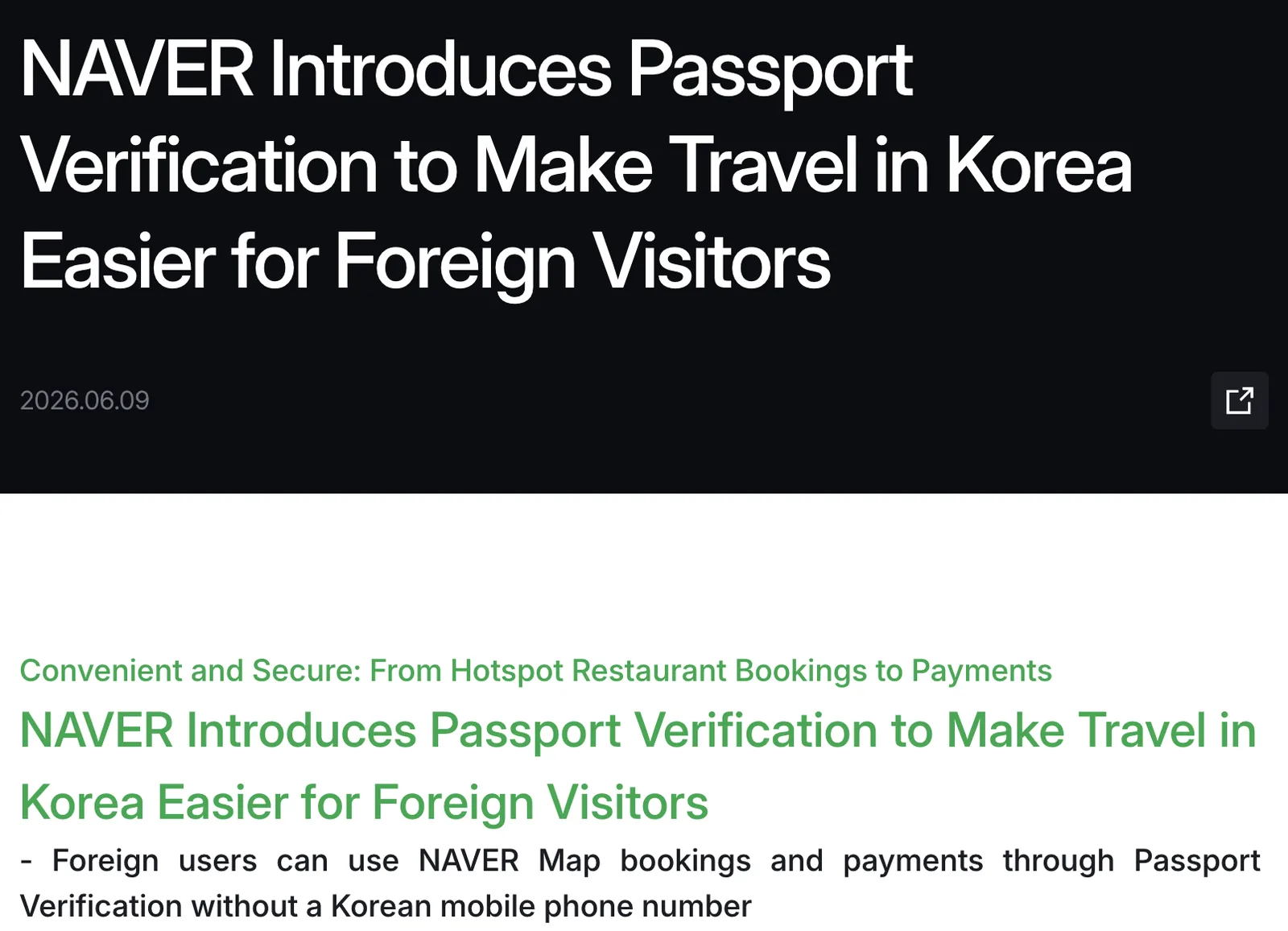
Source: NAVER Corp. press release (navercorp.com), captured 2026-10-01
According to Naver’s own English-language press release, Naver introduced Passport Verification on June 4, 2026, “allowing foreign users to verify their identity with a passport and easily access NAVER Booking, NAVER Order, and payment services.” The press release is explicit that this was built to solve exactly the problem above: “the inconveniences faced by short-term foreign visitors who do not have Korean mobile phone numbers, including difficulties making reservations at popular venues or paying at popular restaurants.”
Who qualifies, per Naver’s official help page:
- A passport issued by a country other than the Republic of Korea
- A passport that hasn’t already been used to verify a different Naver ID (one passport, one account)
- A passport that hasn’t expired
- The name and date of birth on the passport must match what you entered when you signed up for your Naver account
How the verification itself works, per Naver’s help documentation: you take a live photo of your passport directly through your device’s camera (pre-saved photos aren’t accepted), laid flat where light won’t reflect off it, followed by a facial scan that matches your face to the passport photo. You’ll need good lighting and your whole face in frame.
What it actually unlocks: bookings, ordering, and payment through Naver Map. Per the press release, “verification can be completed easily on a smartphone without a Korean mobile phone number or the need to contact customer support.” Naver’s leader for its Digital ID & Auth Platform also said the company “will continue to expand the services that support it in phases,” which is Naver’s way of saying this isn’t everything yet.
How booking works on Naver Map
Per Naver’s official help page, the flow is simple:
- Log in to Naver.
- Search for a place or a keyword (for example, “Gangnam restaurants”).
- If you see a [Reserve/Book/Order] button or a [Booking] link, tap it.
- Pay in advance with Npay (Naver Pay) if the place supports it, or choose [Pay at Store].
⚠️ Watch the status: Naver’s help page warns that “Booking in progress (Booking request)” does not mean your booking is confirmed. Wait for [Confirm Booking] before you head over.
Creating a Naver account in the first place
Before you even reach passport verification, you need a Naver ID. The login screen shows Apple, Google, and LINE social sign-in options alongside the standard ID field. However, Naver’s official account-creation help page states plainly that “you cannot sign up by any means other than your mobile phone,” without specifying whether that phone number has to be a Korean one. Whether a non-Korean number reliably works for this initial signup step isn’t stated in Naver’s official documentation, so if you hit a wall here, the social login buttons (Apple, Google, LINE) are worth trying first.
What’s still unconfirmed about Naver passport verification
A few things worth being upfront about, because Naver’s own public materials don’t spell them out and the verification screen itself requires a login to view:
- Remote restaurant waitlisting: Naver’s official materials mention bookings, ordering, and payment, not restaurant waitlists specifically. Whether a passport-verified foreign user can join a remote waitlist (as opposed to CatchTable Global’s dedicated waitlist feature, covered below) is not confirmed.
- Npay account setup for foreigners: Naver’s booking help pages mention paying through Npay (Naver Pay), but whether a foreign user can open and fund an Npay account without a Korean bank connection isn’t addressed in the official documentation.
- The exact English wording on the verification screen itself: since it sits behind a login, we can’t confirm the precise button or menu text you’ll see.
Note: Naver’s official help page now says account signup requires a mobile phone, so don’t count on signing up with an email address alone. Treat the details above as the current picture.
3. The Catch Nobody’s Talking About: Businesses Can Turn Off Foreign Bookings
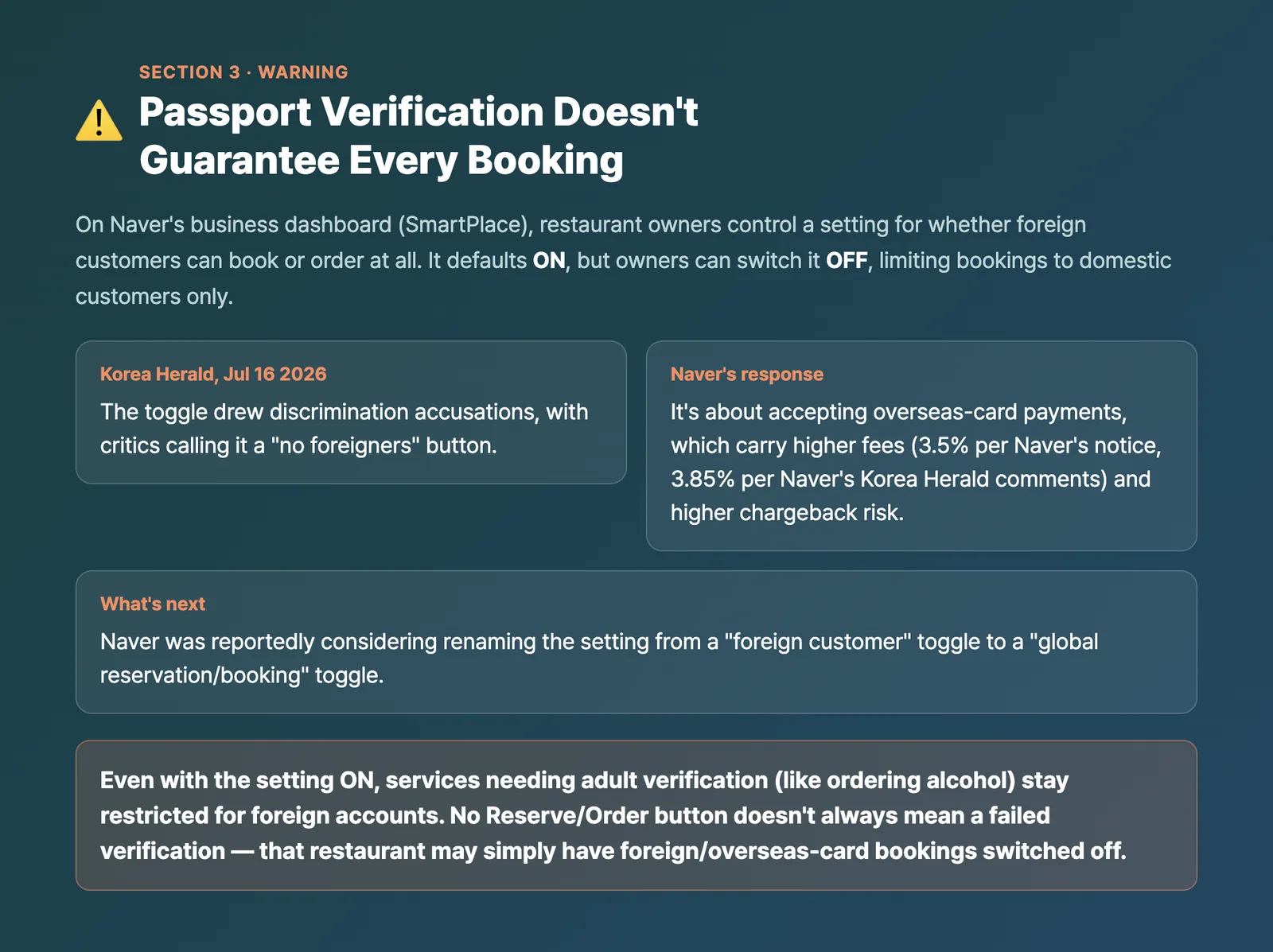
This is the part most coverage of Naver’s passport verification skipped, and it matters more than the verification feature itself.
On Naver’s business-side dashboard (SmartPlace), restaurant owners have a setting that controls whether foreign customers can reserve or order at all. According to Naver’s own notice to business owners, this setting defaults to ON, but any owner can switch it OFF, and doing so restricts bookings to domestic customers only. The notice also states that even with the setting ON, services requiring adult verification, like ordering alcohol, remain restricted for foreign accounts.
The Korea Herald reported on July 16, 2026, that this toggle drew discrimination accusations, with critics calling it a “no foreigners” button. Naver’s response, per the same report, was that the setting isn’t really about nationality. It’s about whether the business is willing to accept overseas-issued card payments, which carry higher processing fees (reported as 3.5% in Naver’s own business notice, and 3.85% per Naver’s comments to the Korea Herald) and higher chargeback risk than domestic cards. The Korea Herald reported that Naver was considering renaming the setting from a “foreign customer” toggle to a “global reservation/booking” toggle to make that distinction clearer.
What this means for you in practice: if you’ve completed passport verification and a restaurant you’re looking at on Naver Map has no Reserve or Order button, or the button doesn’t work, that’s not necessarily a bug on your end or a failed verification. It can simply mean that particular restaurant has chosen not to accept overseas-card bookings. Naver’s help page also notes that the Book/Order button only appears when a store supports Naver Booking at all. Either way, don’t assume every restaurant on Naver Map is bookable just because you’re verified.
4. Restaurants: CatchTable Global Is Actually Built for Travelers
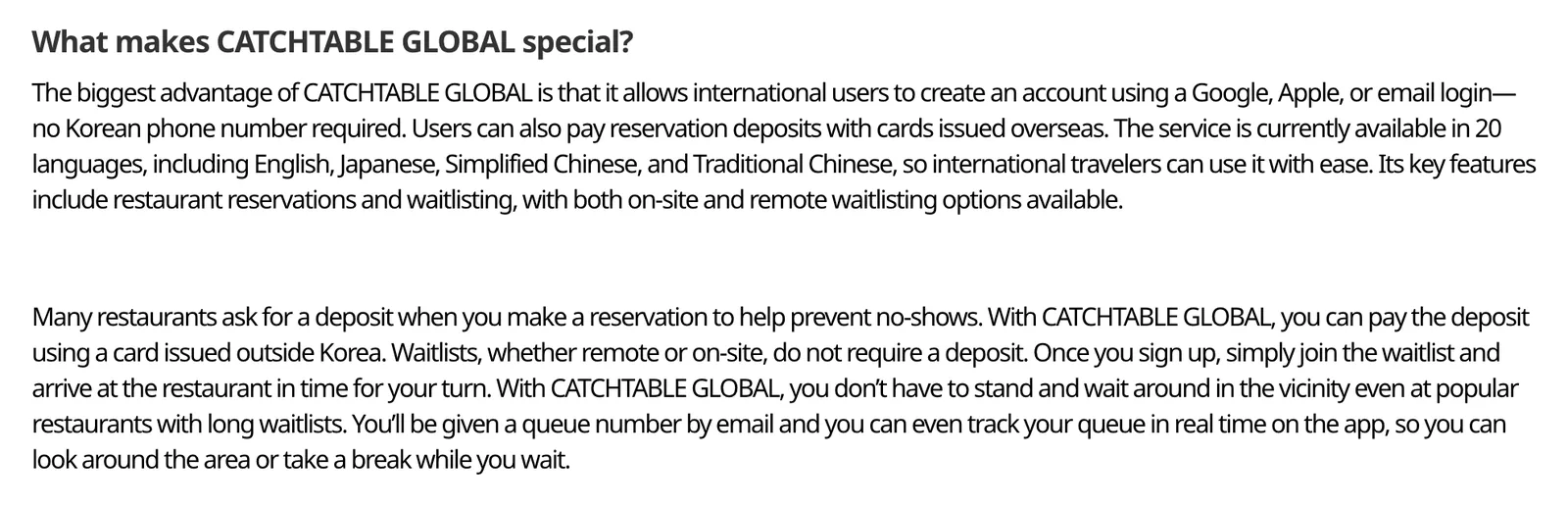
Source: Korea Tourism Organization, VisitKorea (english.visitkorea.or.kr), captured 2026-10-01
Unlike Naver, which added foreigner access on top of a Korean-first product, CatchTable Global was designed around this problem from the start. Per the Korea Tourism Organization’s official VisitKorea page, CatchTable Global “allows international users to create an account using a Google, Apple, or email login, no Korean phone number required. Users can also pay reservation deposits with cards issued overseas.” The service is available in 20 languages, including English, Japanese, Simplified Chinese, and Traditional Chinese. Per company figures reported by Maeil Business Newspaper (June 9, 2026), it has more than 12,000 partner restaurants, from Michelin-starred venues to some of the most popular waiting-list spots.
Reservation vs. remote waitlist: know the difference
Restaurant pages inside the app show one of two buttons, per VisitKorea’s description: Reserve, where you pick a specific time slot, or Join Remote Waitlist, which shows the current number of parties ahead of you and sends you a queue number by email that you can track in real time. Some restaurants only offer on-site waitlisting, meaning you’ll need to join using a tablet at the restaurant once you’ve physically arrived, there’s no remote option for those spots.
Here’s a detail worth remembering: VisitKorea’s page states clearly that “waitlists, whether remote or on-site, do not require a deposit.” Deposits only apply to timed reservations at restaurants that ask for one, and those can be paid with a card issued outside Korea.
Cancellation and no-show fees aren’t standardized
Per CatchTable Global’s current terms of service (effective April 28, 2026), a reservation is confirmed when the deposit is paid, and refunds go back to your original payment method within 3 to 10 days. But cancellation and no-show fees follow each restaurant’s own policy, not a single platform-wide rate. Don’t assume the terms at one restaurant apply at the next.
How much travelers are actually using it
Based on company data reported by Maeil Business Newspaper (June 9, 2026), CatchTable Global’s monthly active users hit 1,125,188 in May 2026, up 122% year over year, with reservations up 71% and waitlist usage up 68%. By country, the biggest user bases were Japan (29.63%), Taiwan (27.32%), Hong Kong (13.71%), mainland China (11.79%), the United States (9.44%), and Singapore (8.12%).
👉 Book a Table on CatchTable Global
5. Taxis: Kakao T’s Phone Number Problem, and the App Built to Fix It
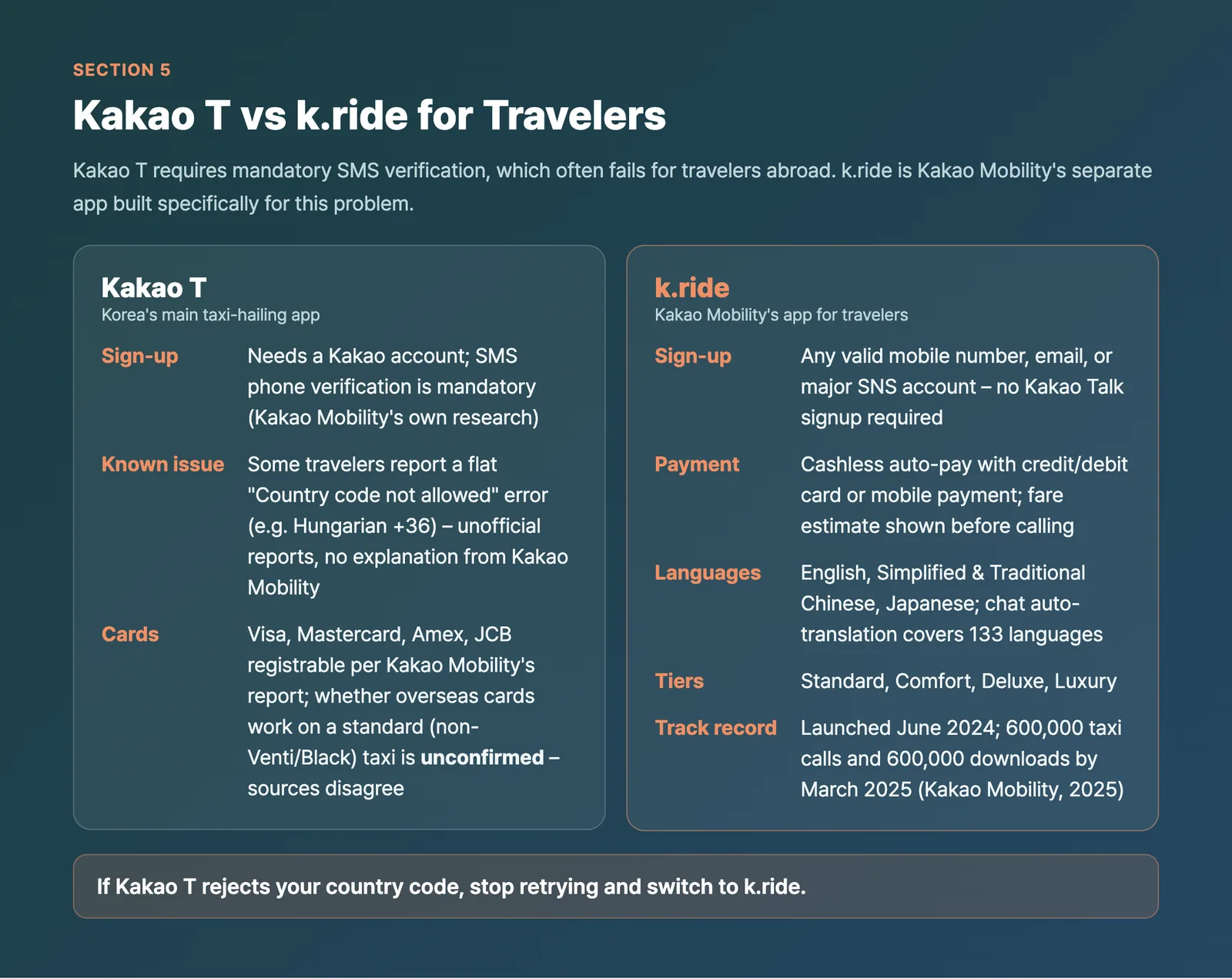
Kakao T is where a lot of travelers first hit the phone-number wall. Per VisitKorea’s official guide, you first need a Kakao account, and you can use your own mobile number to sign up. Kakao Mobility’s own published research says foreigners face no separate restriction when joining Kakao T, but SMS phone verification is mandatory, and text messages often don’t get through to tourists who are outside their home country.
On top of that, some travelers report something more specific: entering certain country codes (one documented case involved a Hungarian +36 number) triggers a flat “Country code not allowed” error during signup, even though the country appeared in the app’s own dropdown list. These reports come from traveler forums, not from Kakao Mobility, and Kakao Mobility hasn’t published any official explanation for which country codes are affected or why. If you hit this error, don’t waste time retrying your number, there’s an official alternative built for exactly this situation.
k.ride: Kakao Mobility’s official app for travelers
k.ride is Kakao Mobility’s own foreigner-focused taxi app, separate from Kakao T. Per k.ride’s official terms of service, you can sign up with “a valid mobile phone number, email, or major SNS account,” not just a Korean number. Payment is cashless auto-pay with a credit/debit card or mobile payment. The app supports four languages (English, Simplified and Traditional Chinese, and Japanese), and destination search plus driver chat auto-translation covers 133 languages. You can see an estimated fare before calling the taxi, and choose from four tiers: Standard, Comfort, Deluxe, and Luxury.
Per Kakao Mobility’s own 2025 announcement, k.ride launched in June 2024 and had logged 600,000 domestic taxi calls and 600,000 app downloads by March 2025. VisitKorea’s guide adds one more useful detail: k.ride “doesn’t require you to sign up on Kakao Talk” the way the main Kakao T app does, which sidesteps the SMS bottleneck entirely.
Some travelers have reported the “Country code not allowed” error above, and the payment picture below is less clear-cut than many older guides suggest. If the main Kakao T app gives you trouble, start with k.ride instead. Our Korea taxi app guide walks through k.ride, Kakao T, and Uber step by step.
Does Kakao T actually accept foreign cards? Sources disagree
Kakao Mobility’s own report (based on data from its 2023 global rollout) states that Visa, Mastercard, American Express, and JCB can be registered on Kakao T, and that an overseas card also lets you book Venti and Black vehicles. However, a 2024 report from Bizhankook said that paying with an overseas card only worked for Venti (large) and Black (premium) taxis. Which version reflects the app’s current behavior for a standard taxi is not confirmed by an up-to-date official source, so if auto-pay with a foreign card fails on a regular taxi booking, that’s a known gap, not necessarily something wrong with your card.
Other ride options worth knowing
- Uber Taxi works in the regular Uber app you already have. Uber has official city pages for Seoul, Busan, Jeju, Incheon, Daegu, Ulsan, Gyeongju and more. Per Uber’s Seoul page, you can pay with a card on your Uber account or choose in-person payment, and you can reserve up to 30 days ahead.
- TADA, per VisitKorea, “accepts international mobile number for app sign up and credit card for payment,” with an English interface and the option to request an English-speaking driver on certain bookings.
- TABA, built with support from the Seoul Metropolitan Government, lets you sign up with a phone number or a Google/Apple ID, auto-pays via your registered card, and runs in English, Japanese, Chinese, Thai, and Russian across Seoul, Busan, Jeju, and Gyeongju.
- MOVV focuses on larger vehicles (4 to 40 passengers) with a driver for airport runs and tours, and per VisitKorea, “all you need is your credit card to book a ride.”
- i.M Taxi and airport limousine bus online booking: we could not find official confirmation of foreign-number signup or overseas-card support for either, so treat both as unconfirmed rather than assuming they work.
At Incheon Airport, there are also officially designated International Taxis and Smart Taxi services with foreign-language support and flat fares into Seoul, no app required, available directly at the taxi stand.
6. Food Delivery: Baemin vs. Coupang Eats vs. Yogiyo
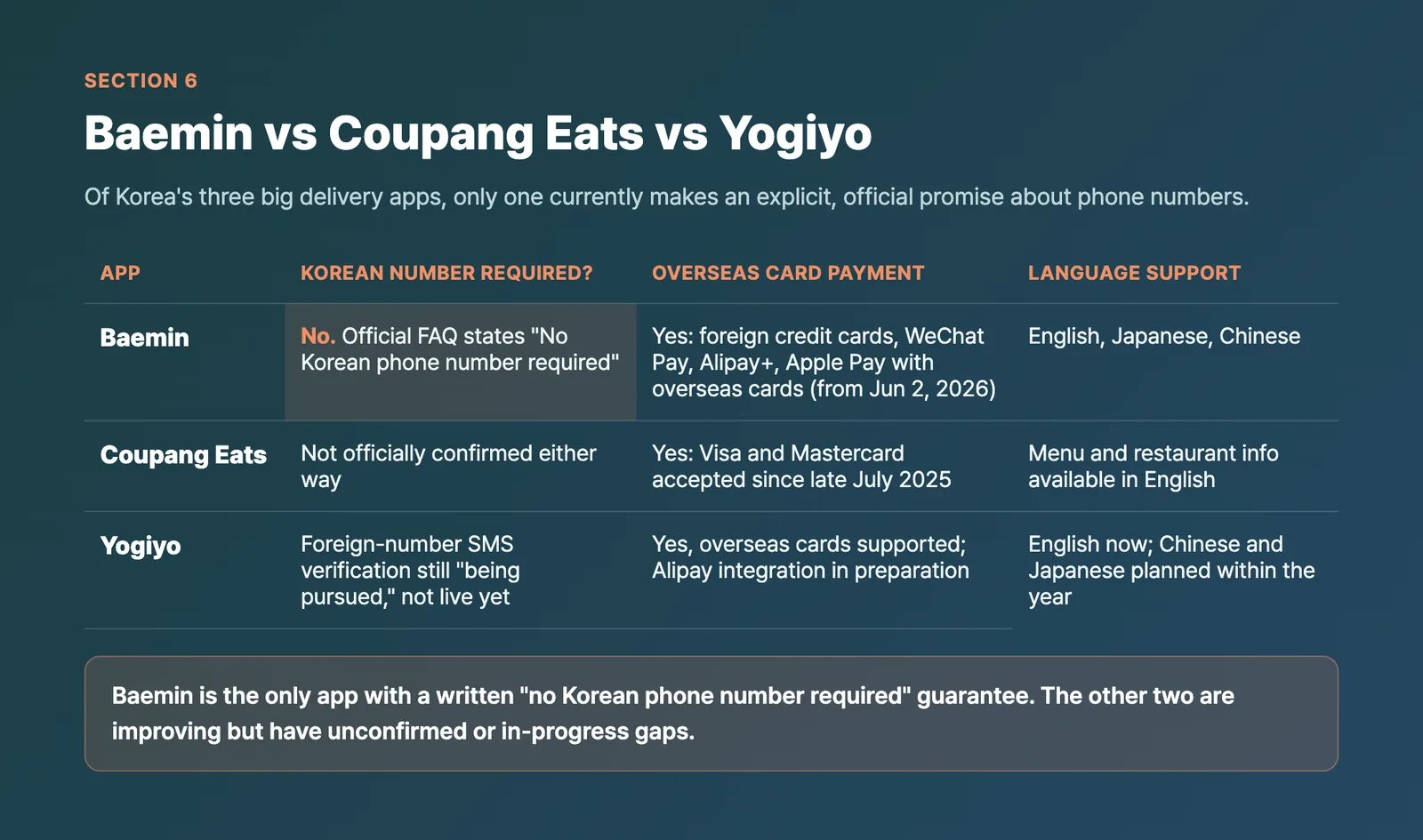
Of Korea’s three big delivery apps, only one currently makes an explicit, official promise about phone numbers.
| App | Korean number required? | Overseas card payment | Language support |
|---|---|---|---|
| Baemin | No. Official FAQ states “No Korean phone number required” | Yes: foreign credit cards, WeChat Pay, Alipay+, and Apple Pay with overseas cards (from June 2, 2026) | English, Japanese, Chinese |
| Coupang Eats | Not officially confirmed either way | Yes: Visa and Mastercard accepted since late July 2025 | Menu and restaurant info available in English |
| Yogiyo | Foreign-number SMS verification is still “being pursued,” effectively not live yet | Yes, overseas cards supported; Alipay integration in preparation | English now; Chinese and Japanese planned within the year |
Baemin: the only one with a clear written guarantee
Baemin’s official global FAQ page states it directly: “We accept foreign credit cards, as well as convenient payment methods such as WeChat Pay and Alipay+. No Korean phone number required.” You can sign in with a Google account, no Korean SIM involved at all. Per Yonhap News (May 31, 2026), Baemin’s parent company Woowa Brothers added Apple Pay support for overseas cards starting June 2, 2026, the first Korean delivery platform to do so. Maeil Business Newspaper reported (July 12, 2026) that in the first half of 2026, orders paid with overseas cards or global simple-payment methods rose 331% year over year, with order value up 308%.
Coupang Eats: card payment works, signup requirement is unclear
Maeil Business Newspaper reported (August 25, 2026) that Coupang Eats has accepted Visa and Mastercard since late July 2025, alongside English-language menu and restaurant information. What’s genuinely unclear is whether creating a Coupang Eats account requires a Korean phone number. We found conflicting unofficial accounts on this point, and there’s no official Coupang statement confirming either way, so we’re flagging this as unconfirmed rather than guessing.
Yogiyo: card payment yes, phone verification not yet
Per the same Maeil Business Newspaper report, Yogiyo currently supports English, plans to add Chinese and Japanese within the year, already supports overseas card payment, and is preparing Alipay integration. On the phone number question specifically, the report describes Yogiyo as “pursuing a plan to support SMS verification via foreign numbers,” which reads as a feature still in development rather than something available today.
If delivery apps aren’t cooperating, you have alternatives
Baemin has a built-in Pickup feature for ordering ahead and collecting food yourself, no delivery address hassle involved. Separately, Naver Map’s own ordering feature (NAVER Order) is included in the passport verification rollout covered in section 2, so a passport-verified Naver account can be used to place takeout or in-store orders at restaurants that support it and have foreign ordering switched on.
7. Still Need a Korean Number? eSIM, KTX, and the 1330 Helpline
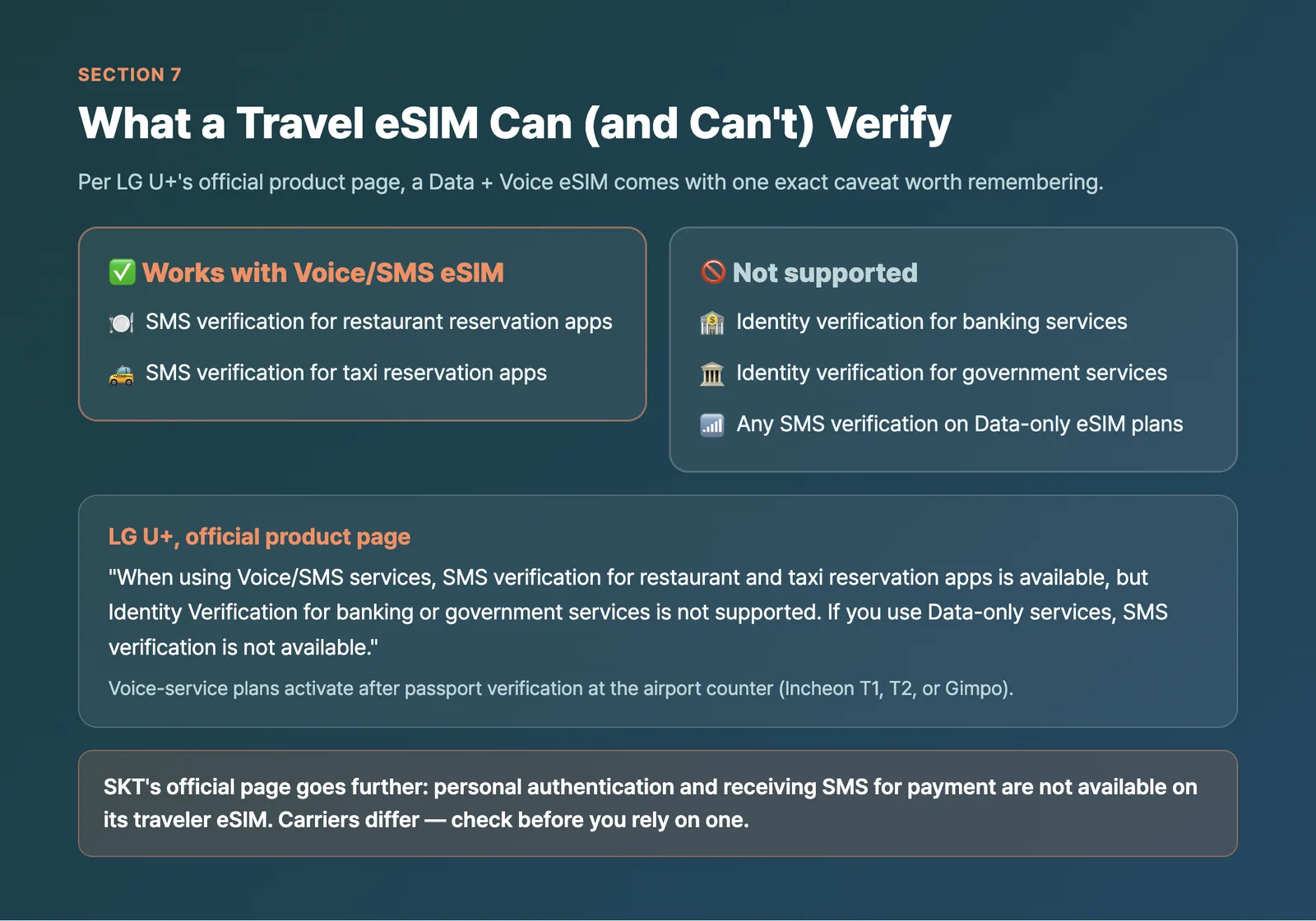
Sometimes none of the above gets you there, and you genuinely want a Korean phone number. A travel eSIM with a voice/SMS plan can help, but only partway.
Per LG U+’s own official product page, a Data + Voice eSIM comes with this exact caveat: “When using Voice/SMS services, SMS verification for restaurant and taxi reservation apps is available, but Identity Verification for banking or government services is not supported. If you use Data-only services, SMS verification is not available.” In other words, a travel eSIM number can pass you through a Kakao T or restaurant app’s SMS check, but it won’t get you through Korean bank authentication or government ID verification systems. Per LG U+, plans with voice service become available after passport verification at its airport counter (Incheon T1, T2, or Gimpo). SKT’s official page goes further and says personal authentication and receiving SMS for payment are not available on its traveler eSIM, so carriers differ. We compare the carriers and plans in our Korea eSIM Guide.
KTX: Korail’s foreign-language site takes overseas cards
If you need to book a KTX train, use Korail’s official foreign-language website rather than a domestic ticket kiosk. Per Korail’s December 2023 press release, its foreign-language websites let you pay with credit cards issued overseas, which the station ticket machines don’t support, and QR codes at 50 major stations (including Seoul and Busan) link straight to those sites. Bookings open one month before departure at 7:00 AM, down to 20 minutes before departure.
1330 Korea Travel Helpline: a human backup
If an app genuinely won’t cooperate, Korea’s official tourist information line, 1330 Korea Travel Helpline (+82-2-1330), operates in Korean, English, Japanese, Chinese, Russian, Vietnamese, Thai, and Indonesian. Per VisitKorea, it can also point you to regional operators of Tourist Taxis, which are interpreter taxis you book in advance.
8. Field-Tested Checklist for When a Booking Won’t Go Through
✅ Before you give up on a reservation or ride, try these
- If a restaurant’s Reserve or Order button is missing or inactive on Naver Map despite you being passport-verified, that business may have its foreign/overseas-card booking setting switched off. Try a different restaurant on the platform, or check if CatchTable Global lists it instead.
- If a restaurant on CatchTable Global only offers on-site waitlisting, go in person and join with the tablet at the restaurant, per VisitKorea’s guide. No deposit is needed for waitlists.
- On Naver Map, don’t head over until your booking shows [Confirm Booking], not just “Booking in progress.”
- If Kakao T rejects your country code at signup, stop retrying and switch straight to k.ride, which is built for exactly this situation.
- Carry a Visa, Mastercard, Amex, or JCB card when trying Kakao T auto-pay, since those are the four brands Kakao Mobility’s own report lists as registrable.
- For food delivery, try Baemin first. It’s the only one of the three major apps with an explicit, official “no Korean phone number required” guarantee.
- If you need a Korean number for anything beyond basic app SMS checks, get a Data + Voice eSIM activated with your passport at the airport counter, not an online data-only eSIM, and don’t expect it to pass bank or government verification either way.
- For KTX, book through Korail’s foreign-language website rather than a station kiosk if you’re paying with an overseas card.
9. FAQ: No Korean Phone Number Questions, Answered
Q1. Can I book a Korean restaurant without a Korean phone number?
A. Yes, in two official ways: CatchTable Global (Google, Apple, or email signup, no Korean number needed) or Naver Map after completing passport verification. Whether a specific restaurant accepts your booking depends on that restaurant’s own settings, not just which app you use.
Q2. I completed Naver’s passport verification but a restaurant still won’t let me book. Why?
A. The restaurant itself may have its foreign/overseas-card booking setting turned off on its Naver SmartPlace dashboard. Per the Korea Herald, this is a business-level toggle, not a sign your verification failed.
Q3. Can I use Kakao T with a foreign phone number?
A. There’s no official rule against it, but SMS verification can fail to reach overseas numbers, and some travelers report a “Country code not allowed” error with no official explanation from Kakao Mobility. k.ride, Kakao Mobility’s own app for travelers, is the more reliable starting point.
Q4. Which delivery app works without a Korean phone number?
A. Baemin explicitly states no Korean phone number is required. Coupang Eats accepts overseas cards but its phone number requirement at signup isn’t officially confirmed. Yogiyo’s foreign-number SMS verification is still being developed, not live yet.
Q5. Will my travel eSIM number work for these apps?
A. Only if it’s a voice/SMS plan. Per LG U+, a voice/SMS eSIM works for SMS verification on restaurant and taxi reservation apps, but not for banking or government identity verification. Data-only eSIMs can’t receive SMS codes at all.
Q6. Can I use Naver Map’s remote restaurant waitlist with a passport-verified account?
A. This isn’t confirmed. Naver’s official materials describe passport verification as covering bookings, ordering, and payment, not remote waitlisting specifically. CatchTable Global’s remote waitlist feature is the better-documented option for this.
The Bottom Line
2026 genuinely changed what’s possible in Korea without a Korean phone number: Naver’s passport verification (June 4, 2026), CatchTable Global’s foreigner-first signup, Baemin’s explicit no-Korean-number policy, and Kakao Mobility’s dedicated k.ride app. But none of it adds up to a single universal fix, it’s still app by app, and sometimes business by business.
Quick recap:
- Naver Map bookings, orders, and payments work without a Korean number after passport verification, launched June 4, 2026, but individual restaurants can still opt out of foreign/overseas-card bookings.
- CatchTable Global is the most travel-ready restaurant option: Google/Apple/email signup, overseas-card deposits, and no-deposit waitlists across 12,000+ partner restaurants.
- Kakao T’s SMS signup can block some country codes with no official explanation; k.ride is Kakao Mobility’s own fix for travelers.
- Baemin is the only major delivery app with a written “no Korean phone number required” promise; Coupang Eats and Yogiyo are improving but have unconfirmed or in-progress gaps.
- A Data + Voice eSIM covers app SMS checks but not banking or government ID, and Korail’s foreign-language site is the easiest way to book KTX with an overseas card.
Keep this checklist handy, and when one option doesn’t work, you’ll usually have a second one ready.
👉 Check k.ride’s Official App Details for Travelers
Related guides
- Korea Taxi Apps for Tourists: k.ride, Kakao T or Uber? (2026)
- Naver Map in English: Why Google Maps Fails in Korea (2026 Guide)
- Korea eSIM Guide: Which Network Are You Really Buying?
Sources
- NAVER Corp. press release: Passport Verification for foreign visitors
- NAVER Help: Foreign Passport Verification
- NAVER Help: How Users Make Bookings
- NAVER Help: How to create an individual account
- NAVER SmartPlace notice: foreign customer reservation/booking setting
- The Korea Herald: Naver to change “no foreigners” button after discrimination accusations
- Korea Times: Naver introduces passport verification for foreign travelers
- VisitKorea: CatchTable, Book Michelin-starred Restaurants and Local Favorites
- CatchTable Global official site
- CatchTable Global Terms of Service
- Maeil Business Newspaper: CatchTable Global tops 1 million foreign users
- VisitKorea: Ride-hailing Apps in Korea
- VisitKorea: Taxi
- Kakao Mobility report: Taxi? No problem! Exploring foreign tourists’ use of Kakao T
- k.ride official site
- k.ride Terms of Service
- The Korea Herald: Kakao launches K.ride for foreign travelers
- Uber: Seoul Taxis
- Incheon International Airport: Incheon taxis
- Baemin official page for foreign users
- Yonhap News: Baemin adds Apple Pay for overseas cards
- Maeil Business Newspaper: Delivery apps compete for foreign customers
- Maeil Business Newspaper: Foreign orders on Baemin surge
- Coupang Newsroom: FAQ on orders and payment
- LG U+ official Korea eSIM product page
- KORAIL Ticketing Guide for foreign visitors
- Korail press release: Easier ticket purchases for foreign visitors via QR code